On macOS, application installation is far simpler than on Windows. For most apps, you simply download them, and end up with a single file ending in “.app”, which you just drag to your “Applications” folder, and that’s it! Uninstalling is as easy as dragging the app to your Trash. Or is it?
Over time, apps build up cruft, such as settings, caches, and support files. For most apps, these files take up little space, and it can be worth keeping the settings file around, just in case you reinstall the app later. Some apps, though, can leave behind large caches that eat into your valuable disk space.
So what if there was a way to find all this cruft and delete it easily?
That’s exactly where AppZapper 3000 comes in. It’s a modern remake of classic Mac app which was originally released way back in 2006!
How does it work?
Instead of dragging the app to the Trash, drag it into AppZapper instead, and you’ll be presented with a list of all the support files the app has created on your system, and how much disk space they’re taking up:

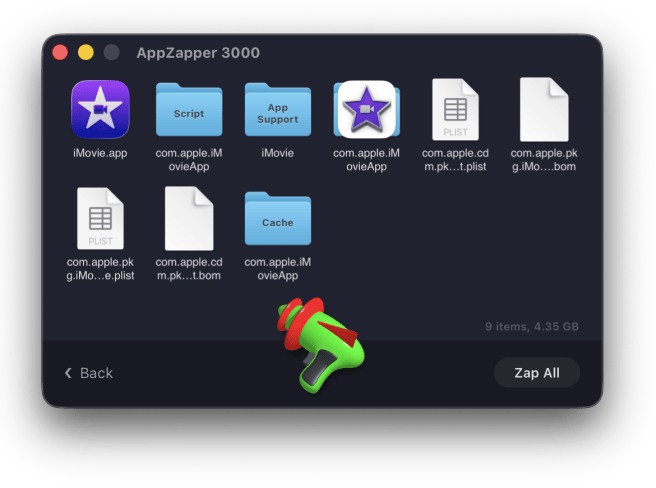
Then the fun part – you literally grab the laser pistol and start blasting, and each file you hit gets deleted! It’s mad, but it’s great fun, and I absolutely love to see the return of quirky and whimsy design in modern apps, it’s really refreshing.

Summary
Overall, AppZapper does one job and does it well. Simply drag old apps onto it, easily find all the old baggage they left behind, and blow it all away… literally 😅
It’s great to see a classic Mac utility rebuilt for modern macOS, and I’d encourage you to give it a try.
AppZapper 3000
by Austin Sarner, Brian Ball and Clemens Knieper
https://www.appzapper.com
The uninstaller Apple forgot. The most fun uninstaller for macOS has been rebuilt for the 31st century.
Drag in any app and instantly find all of its extra files. Then delete them with a real 3D zapper.
💰 From $18, with three free zaps to try it out first.