Yes, I know. I’m sure some of you will be thinking this is a bit of a random post, as you double-check your calendars to make sure that it is indeed the year 2025. Don’t worry, I’m not going to start talking about fax machines and record players, but I wanted to share some recent experiences with good old Visual Voicemail.
History
I remember my first mobile phone had voicemail, but the process to listen to your messages was a bit tedious. If someone left you voicemail, the network would send you a text to let you know, along with the number that called. As this didn’t link to your address book, you’d have no idea who it was unless you’d memorised all your friends’ phone numbers, so you’d then have to dial the voicemail service to listen to the actual message.
After navigating through the various menus, the caller’s number would be read out slowly, one… number… at… a… time, and finally you’d get to hear the message itself. After struggling to decipher the low quality recording, and assuming you even recognised the voice of the person, you could then return their call. And that’s assuming the message you wanted to hear was the first one in the list. You may have had to listen to several before you got to the one you wanted. Not really the best experience.
When the original iPhone was revealed back in 2007, one of the features they mentioned for the “Phone” app, was Visual Voicemail, which Steve Jobs described as “Random Access Voicemail”, and it worked more like email than the system we were used to. New voicemails would just show up in the inbox for you to listen to, in whichever order you wanted, and you could easily scrub through the audio, then return the call with a single tap if you liked. It even let you record a custom greeting right there in the “Phone” app. The difference was night and day.
There was only one slight complication – this feature required support from the mobile carriers to work; it wasn’t something that could be done entirely on device. Here in the UK the iPhone launched on the O2 network, so they supported Visual Voicemail from day one, but incredibly there are still some networks that don’t support it, even after the iPhone stopped being exclusive to O2.
SIM hopping
For various years I’ve been hopping between networks to take advantage of the best deals, and there’s one thing that I always, ALWAYS notice, and that’s whether the network supports Visual Voicemail. Every time I try a carrier that doesn’t support it, I think maybe I can live with it, maybe the deal is so good it’s worth the trade-off, but every time I try, I’m wrong.
Issues with signal quality are surprisingly common in the UK, so missing a call on a network without Visual Voicemail feels a bit like being thrown back in time. Dialling a clumsy old voicemail service rather than having my messages magically appear as soon as I get better signal, always leaves me pining for this simple little service from the original iPhone.
And it’s not that I’m some sort of celebrity, dealing with hundreds of calls a day! It’s just that the way we communicate with our friends and family has changed. These days we tend to text more than we call, keeping in touch with our loved ones via group chats and photo sharing. But this means if someone does call when I’m out of service, it’s usually for something important that I don’t want to miss.
Taking it to the next level
Since I’ve recently returned to a network that supports Visual Voicemail, there were some new features introduced back in iOS 17 that I had wanted to take for a spin, and I’ve found them to be really useful.
Live Voicemail
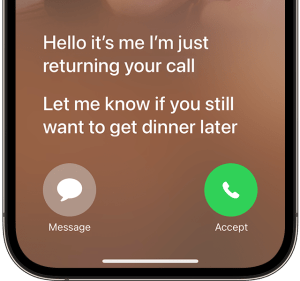
This feature is really handy for screening unknown numbers. The way it works is your phone answers the call, but Siri does the talking, asking the caller to leave a message, as if they had reached voicemail. But as the caller is speaking, their words are transcribed in real-time, so you can see on the lock screen what the call is about. You can even decide to pick up if it’s a call you actually want to take.
Transcriptions
The transcriptions captured from Live Voicemail are saved in the Voicemail tab of the Phone app, but what about regular Visual Voicemail? Well iPhone automatically transcribes those as they are delivered from the network, so you’ll get a transcription no matter which method you use. I’ve found it very useful, and the quality seems pretty good, with only occasional mistakes, which are usually self-explanatory based on the rest of the message.

Getting out of the way
Overall, these features work so well together, they make it a breeze to catch up on any calls I miss when I’m out and about, and are a great example of technology helping to make things easier, rather than getting in the way. For me, that is truly technology at its best.
As an aside, I wonder how many younger people today know that the voicemail icon represents an old reel of audio tape? 3D-printed save icon anyone?
 ryBlog