Clear, meaningful, commit and pull request messages are essential when working on a shared codebase. They serve a couple of important purposes:
- They help everyone find out later why a particular change was made to the code, by making search results more relevant.
- They speed up the reviewing process and make it easier for the reviewer to understand the intention behind a change.
What makes a good commit?
When writing your commit message, try to consider whether it answers these questions:
- Why is this change necessary?
- Does it add a new feature? Does it fix a bug? Does it improve performance? Why is the change being made?
- How does this change address the issue?
- For small obvious changes this might not be necessary, but for larger changes a high level description of the approach used can be helpful.
Try to keep your commit messages small; no more than a sentence or so. Make sure you focus on answering the “why?” question.
If you need more space to explain your commit, add a message body separated from the summary with a blank line, like so:
Short summary of changes here.

More detailed explanatory text, if necessary. Wrap it to about 72 characters or so,
but you can add as many paragraphs as you need to explain the change properly.

Imagine the first line is like the subject of an email (it's what most Git clients
will show prominently), and the rest of the text is the body of that email.

  * You can even use bullet points like this one.

  * And this one!
If you are finding it difficult to write a commit message in this format, it may mean that your commit represents too many different changes, and should be broken up. This doesn’t mean to say you should be creating a new commit for every insignificant change, that’s not what we’re aiming for here, instead try to create commits that represent groups of changes that are moving you closer to your end goal iteratively.
Continuous Integration and Continuous Deployment (CI/CD)
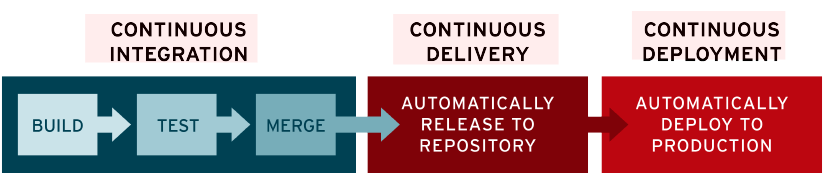
The concept of Continuous Integration can help guide us here. This is the practice of merging developers’ commits into the main branch several times per day.
This concept often goes hand in hand with the practices of Continuous Delivery and Continuous Deployment, meaning your changes are being merged to main, and then automatically deployed to production, several times per day. This gives you a really tight feedback loop, and prevents changes from building up which would otherwise lead to the dreaded big bang release.
In order for this to be successful, we need to make sure our commits contain working changes that can be deployed to production. Also think about what would happen if a deployment needed to be rolled back to a previous commit?
We need to consider all of these things when creating our commits.
Staging Partials
What happens if you’ve made several unrelated changes to the same file, and you aren’t ready to commit some of those changes yet? You can use Patch Mode to stage specific modifications to a file, so you can commit just those changes, instead of needing to commit the entire file and every change.
Many editors support staging partials, for example Visual Studio Code.
Bad Habits
Here are some things to avoid when committing:
Large commits
One extreme I’ve seen is waiting until the end of the day and then doing one big commit with every change from that day. Don’t do this! It results in a huge useless diff of likely unrelated changes. Other contributors working on the repository will find it more difficult to read and understand your work. This also applies to yourself once enough time has passed!Consider making small, regular commits as you go, in groups of related changes, rather than everything at the end in one go.
Per-file commits
On the other side of the spectrum, I’ve also seen people creating one commit for each file that was changed, but when adding a new feature to a project, you’ll often be making changes across several files.Commit all of the changes related to the new feature together, in a single commit. This avoids leaving the project in a broken state if someone pulls a commit that has a half implemented feature in it. It’s also easier for people to review.Of course, if the change did only need to touch a single file, then this is ok.
Lazy commit messages
Avoid any commit message along the lines of changed $filename or misc fixes. These messages are frustrating to encounter, and make it much harder for others to see what is happening in the project. They should be avoided in favour of a concise, meaningful message.We can see that the file was changed, what we want the answer to is “why?”.GitHub’s web-based editor doesn’t exactly help here, as it defaults to Update <filename> as the placeholder text. Make sure you provide a better message before you click that Commit changes button.
Unrelated changes
As we’ve discussed above, you should aim to create one commit per feature. Don’t include unrelated changes in the commit, as it makes it harder for others to reason about the changes being made. This will also make it more difficult for reviewers.
Branches and Merging Strategies

If you’re not pushing directly to main, you’ll be using branches instead. This advice is just as valid for branches, but my recommendation would be to use short-lived feature branches. You want to get the code merged into main as quickly as possible, as the longer a branch remains the more likely you are to have problems merging it, as the code continues to diverge.
GitHub uses the Pull Request approach to merge changes back to the main branch, and offers a number of merging strategies you can use.
Merge commits
Adds all the commits from the branch to the main branch via a merge commit. You can continue adding new commits to the branch if necessary, and merge them later. This is the default behaviour.
Squashing merge commits
Creates one commit containing all of the changes from every commit in your branch. You lose information about when specific changes were originally made and by who.If you continue adding new commits to a branch after squashing and merging, when you attempt to merge the branch again, the previously merged commits will show up in the PR, and you’ll potentially have to deal with conflicts.
Rebase and merge
All commits from the branch are added to the main branch individually without a merge commit, by rewriting the commit history. This is a tricky strategy which can sometimes require manual intervention to resolve conflicts on the command-line rather than via GitHub’s web interface. This would then require a force-push to resolve, which is a dangerous feature, and can result in other contributors work being lost.
Even when you are not using the default strategy the advice in this post still stands, as you’ll still benefit during development of the branch, and also when you open your PR for review. Once merged the PR will continue to be useful as you can view the contents on GitHub and see more clearly what happened and why.
Closing
I hope that this has been a useful exploration of what makes a good commit, and the best practices like CI/CD that they help to support. It should help you to deliver better software by creating concise, well-crafted commits that your team mates will find easier to reason about, and thank you for later.
 ryBlog